All Synology Diskstations come with the ability to host a dynamic, database-driven website or 3rd party web applications with MySQL & PHP technologies. We will be showing you how to upload web pages to your Synology station and manage your database. please note users are still required to write their own web page code, if they wish to use this function. The Virtual Host feature allows you to host up to 30 websites using Web Station, with PHP and MySQL supported.
How to enable Synology's Web Services
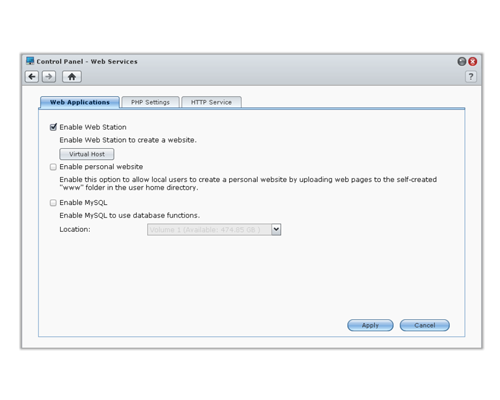
Go to Main Menu > Control Panel > Web Services to set up your website with Web Station, which is integratedwith support for PHP and MySQL.
When Web Station is enabled, the web shared folder will be created automatically. Save your web page content in the folder to publish it on your website.
To enable Web Station: Tick
 Enable Web Station
 and click
Apply.
Below is a list of what is supported and the limitations of Web Station.
• The Homepage for your website must be names index.htm, index.html or index.php.
• PHP 5.3.2 is supported.
• When you use the PHP main() function, the system will automatically retrieve and the the SMTP
server
• The following functions are not supported by PHP: system(), exec().
• The real path of the web shared folder is /volume1/web. Some applications require the user to set
the path in the configuration file.
• The names blog, photo, photosrc, and webdefault are reserved folder names. These names
cannot be used by Web Station, so please do not create folders with these names under the web
shared folder. You can customize the error page by creating any of the following files and putting
them in the web shared folder: missing.html, missing.htm, or missing.php. When users try to
connect to a page that does not exist, this customized error page will be displayed.
With the Web Station feature, you can create a website with web pages on the Synology DiskStation. With builtin PHP and MySQL support, you can create dynamic, database-driven website for your business. There is also a variety of 3rd party packages such as Content Management, Customer Relationship Management & eCommerce system in Package Center, so that you can install them with a few clicks. The default shared folder, "web" will store the web page files for your website.
Enable Virtual Host to Host Websites
You can host multiple websites on a single server with virtual host feature. Each website can have different port numbers or even different hostnames.
Enable Personal Website
The personal website function is a convenient way to allow Synology DiskStation users to host their own personal websites. Each local user, domain user and LDAP user will have a unique website address.